



Description
Download Halloween 3D ScreenSaver – Halloween screensaver, 3D pumpkin animation, spooky Halloween app, Halloween decor, Halloween atmosphere
Overview
Purpose and User Experience
Halloween 3D ScreenSaver is a mobile application designed to transform the user’s device screen into a dynamic, seasonal display that captures the spirit of Halloween. The app functions as a visual and auditory experience, bringing a festive yet eerie atmosphere to Android devices during the Halloween season. Its primary purpose is to enhance the user’s digital environment with immersive animations and thematic soundscapes, creating a sense of occasion without requiring active engagement. The app is ideal for users who enjoy seasonal themes, particularly those seeking to express their Halloween enthusiasm through their mobile devices. It serves as a digital decoration, offering a unique way to celebrate the holiday beyond physical decorations. The target audience includes casual users, Halloween enthusiasts, and those who appreciate visually rich, ambient mobile content. Although the developer did not provide additional background details, the app’s focus on seasonal immersion suggests a niche but dedicated user base. Real-world use cases include personal device customization, background ambiance during seasonal gatherings, or simply adding a playful scare to idle screen time. In the broader app ecosystem, it occupies a specialized space as a utility with entertainment value, offering a low-effort, high-impact way to participate in seasonal culture.Key Features & Functionality
Immersive 3D Visuals and Animations
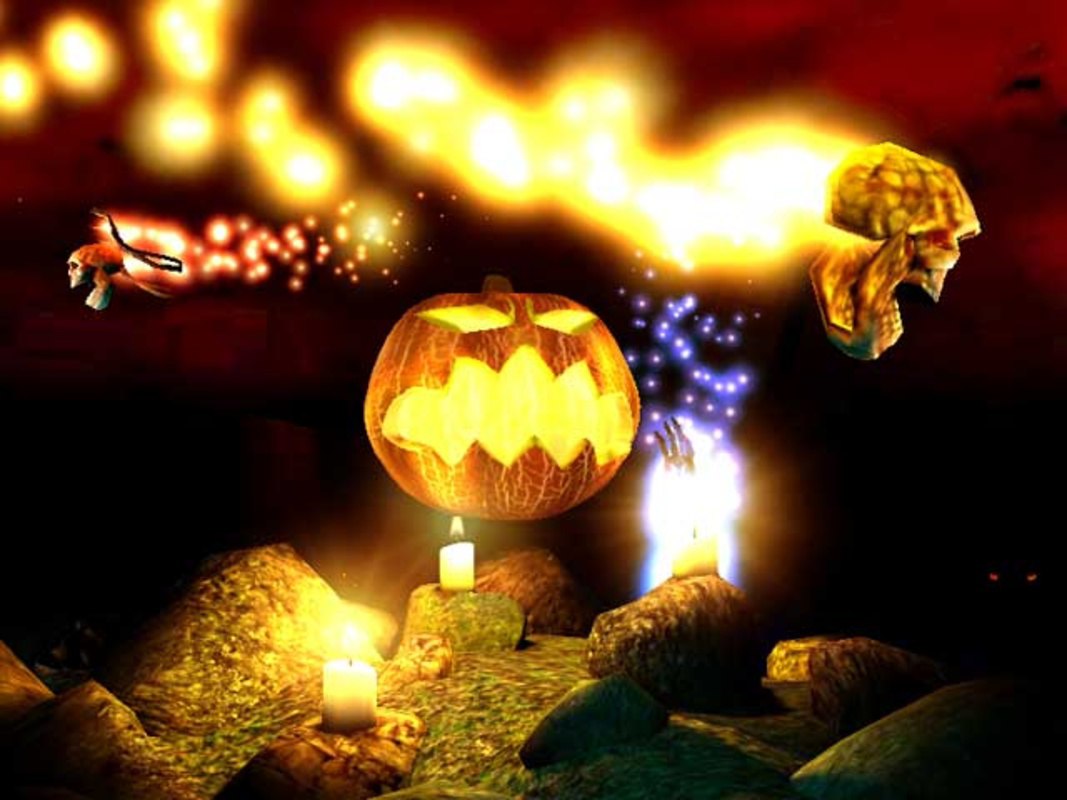
The app centers on a beautifully rendered 3D pumpkin that serves as the focal point of the screensaver. This pumpkin is animated with subtle movements, glowing with an internal light that shifts in intensity, creating a lifelike and captivating presence. Surrounding the pumpkin are various horror-themed creatures, each contributing to the overall spooky ambiance. These animated elements are designed to appear naturally within the scene, moving in sync with the environment. The visual experience is enhanced by dynamic light and shadow effects, which add depth and realism to the display. These effects simulate how light interacts with objects, casting realistic shadows and highlights that respond to the animation. In addition to the central pumpkin, the screen features Halloween-themed decorations such as flickering candles, glowing eyes, and spectral hands, all placed to create a cohesive and immersive scene. The combination of these visual components results in a rich, layered experience that feels alive and responsive to the theme. Users benefit from a distraction-free, ambient display that enhances the mood of the season without consuming system resources.- 3D pumpkin animation with glowing internal light
- Animated horror-themed creatures in the background
- Dynamic light and shadow effects for realism
- Seasonal decorations including candles and glowing eyes
- Seamless background operation with minimal resource usage
Atmospheric Audio Integration
Halloween 3D ScreenSaver incorporates sound effects that complement the visual elements, deepening the immersive experience. These audio cues include subtle whispers, distant laughter, and ambient creaks, all carefully synchronized with the animations. The sound design enhances the eerie atmosphere, making the screensaver feel more responsive and alive. The audio is designed to play only when the screen is idle, ensuring it does not interfere with active app usage. This feature is particularly effective during evening hours or in dimly lit environments, where the combination of visuals and sound can create a more intense mood. The audio is looped seamlessly, avoiding abrupt restarts or disruptions. For users who prefer silence, the app may offer mute functionality, though this was not specified. The auditory component adds emotional weight to the experience, transforming a passive screen display into a multi-sensory event that resonates with the Halloween spirit.Interface, UX & Performance
The interface of Halloween 3D ScreenSaver is minimal and focused on functionality rather than user interaction. The app likely features a simple setup screen with options to enable or disable the screensaver, adjust activation timing, or select visual themes. Navigation is straightforward, with intuitive controls that require little to no learning curve. The visual style emphasizes atmospheric design, using dark color palettes, subtle gradients, and high-contrast lighting to highlight the 3D elements. The layout ensures that the central pumpkin remains visually dominant while supporting elements are distributed to avoid clutter. The app operates in the background, launching automatically when the screen is idle, which contributes to a seamless user experience. Although the developer did not list formal performance metrics, the app’s 15.6 MB size suggests efficient resource usage. It is designed to run smoothly on a range of Android devices without causing lag or excessive battery drain. Responsiveness is likely optimized for idle screen conditions, ensuring smooth animation playback. Stability is expected to be high, given the app’s long-standing presence and simple functionality. Users can expect consistent performance across different device categories, from budget models to high-end smartphones.Platform Compatibility & Technical Requirements
Halloween 3D ScreenSaver is available exclusively on the Android platform. The app requires Android OS, though specific version details were not provided by the developer. The file size is 15.6 MB, which is relatively compact for a visually rich application. This size suggests that the app is optimized for efficient storage and quick installation. The app is offered for free, making it accessible to a wide audience without financial barriers. The developer did not specify minimum OS requirements, device compatibility, or hardware capabilities. As such, users should ensure their devices support Android-based screen savers or similar background animation features. Compatibility with specific device models was not disclosed. The app’s release date was January 21, 2011, indicating a long-standing presence in the Android ecosystem. While the app may not have received recent updates, its continued availability suggests stable functionality across generations of Android devices.Pros and Cons
Pros
- Free to download and install, with no in-app purchases
- Compact file size (15.6 MB) for efficient storage use
- Immersive 3D visuals and atmospheric animations
- Minimal system resource usage during idle operation
- Simple setup and seamless background functionality
Cons
- Developer did not provide information on minimum OS requirements
- No details on update frequency or future development plans
- Compatibility with specific device models was not listed
- Limited user interaction or customization options
- Audio may be intrusive for some users in quiet environments
FAQ
Is Halloween 3D ScreenSaver safe to download?
Yes, the app is available for free on Android and does not require any suspicious permissions. It operates as a background screensaver with no known security risks.Can I use this app on iOS devices?
The app is currently only available on Android. No iOS version has been released or announced.Does the app drain battery quickly?
The app is designed to run only when the screen is idle and uses minimal resources. Battery impact is expected to be low.How do I set up the screensaver?
After installation, the app likely offers a simple on/off toggle. Users may need to enable it in their device’s display or screen saver settings.Is there a way to customize the animations?
The developer did not provide details on customization options. The experience appears to be fixed and non-configurable beyond basic activation.Final Thoughts
Halloween 3D ScreenSaver delivers a nostalgic and atmospheric experience that remains relevant for seasonal users. Its focus on immersive visuals, subtle animations, and ambient sound makes it a standout choice for anyone looking to add a touch of Halloween magic to their Android device. While it lacks modern customization and update transparency, its simplicity and low resource usage ensure reliable performance. The app is particularly valuable for users who appreciate themed digital content and enjoy transforming their devices into seasonal displays. With its free access and compact size, it offers strong value for a niche audience. For fans of Halloween decor and ambient mobile experiences, this app remains a compelling option. Download Halloween 3D ScreenSaver now.Guides & Tutorials for Halloween 3D ScreenSaver
How to install Halloween 3D ScreenSaver
- Click the Preview / Download button above.
- Once redirected, accept the terms and click Install.
- Wait for the Halloween 3D ScreenSaver download to finish on your device.
How to use Halloween 3D ScreenSaver
This software is primarily used for its core features described above. Open the app after installation to explore its capabilities.
User Reviews for Halloween 3D ScreenSaver 0
No reviews found


